

The best smart home system for a new build is the one that is chosen before the cabling goes in, suits the size of the house and the way the household lives, and can still be extended and serviced years after the builder has left. This guide explains the two routes open to anyone building in Australia, what to decide at each stage of the build, and where PIXIE fits.
Building a new home is the one time every option is open. The walls are not yet lined, the electrical plan is still on paper, and decisions that would be expensive in a finished house cost very little. That freedom is also why new builds are where people most often overspend on automation they rarely use, or leave the decision so late that the builder’s standard switches go in by default. The useful approach is to settle a small number of questions early, in the right order.
The two routes for a new build
A hardwired control system
A hardwired system runs a dedicated control cable to every switch and every controlled circuit, with the control equipment mounted beside the switchboard and the whole system programmed by a specialist. A new build is the natural time to install one, because the cable can go in before the walls are lined. These systems are capable and well proven in large homes, particularly where lighting is tied into home cinema and audio visual equipment. They add a second cabling job and a programmer to the project, and later changes usually mean a return visit.
Best suited to: large custom homes with a specialist integrator engaged from the design stage.
A wireless mesh system on standard cabling
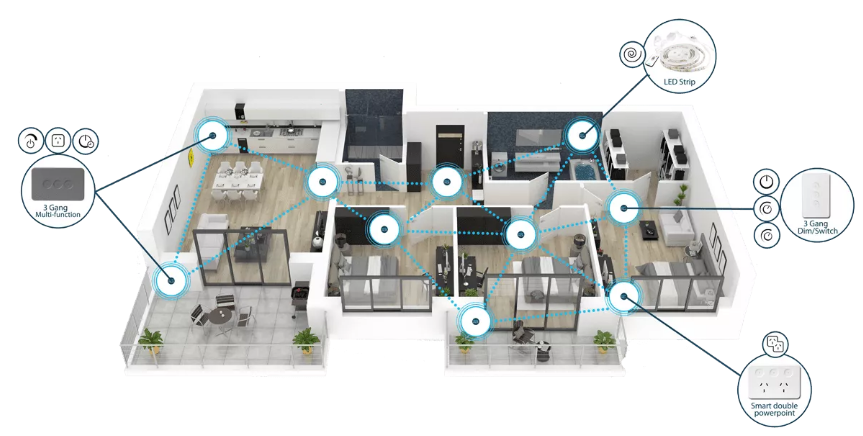
A wireless mesh system uses the same electrical cabling as any other house. Smart switches and dimmers go in at the usual switch positions and communicate with each other wirelessly, so there is no control cable and no central controller. The electrician who wires the house can install it, and the household can add to it later without opening a wall. Some wireless systems report to a hub that everything depends on, and some need no hub at all, which is worth asking about.
Best suited to: most new homes, from project builds to architect-designed houses.
What to decide, and when
At the plans stage
Decide what the home should do before deciding what to buy. A short list of what matters most to the household, such as lighting, ceiling fans, blinds, the garage door and air conditioning, is more useful than a product list. This is also the time to mark switch positions on the electrical plan, and to tell the builder which system is to be installed so that the electrical allowance reflects it.
Before the cabling goes in
A few items are cheap at this stage and costly afterwards, whichever system is chosen. Motorised blinds and curtains need power at the window. Televisions and wifi access points are better served by data cabling than by wifi alone. It is also worth asking the electrician about running a neutral to each switch position, which costs little during construction and keeps every option open for the future.
At fit-off
The devices are installed with the switch plates and then set up. Ask who is doing the setup and whether it is included in the price, because a system that has been installed but not configured to suit the household is only half finished.
At handover
Make sure the system is handed over in the owner’s name, with the owner able to change schedules, scenes and access for themselves.
Questions to ask the builder
- Is the smart home allowance for a particular system, and can a different one be chosen?
- Will the builder’s electrician install the system, and have they installed it before?
- Does the price cover the products, the installation and the setup?
- Can more devices be added after handover without new cabling?
- Who supports the system once the builder’s warranty period has ended?
Where PIXIE fits in a new build
PIXIE is a wireless mesh system with no hub, designed in Australia by SAL National and installed by licensed electricians. In a new home it takes the second route: standard electrical cabling, with no separate control cabling to design, install or pay for.
It can be planned before the build starts. PIXIE offers a free smart home design service, which turns a set of house plans into a smart home design that the builder and electrician can price and install.
There are three ways to lay it out. The simplest and most cost effective is a smart switch or dimmer at each usual switch position. A second is to group devices in a few key positions, which reduces the number of wall plates in homes where a minimal look matters. The third places the devices centrally, near the switchboard, with PIXIE Touch Panels at chosen points around the home for control, which needs a PIXIE Gateway.
One app covers the house. Lighting, ceiling fans, blinds, curtains, awnings, garage doors, smart power points and ducted air conditioning from Daikin and Mitsubishi Electric are controlled together in the free PIXIE PLUS app, with no subscription. How the air conditioning, fans and lighting work as one system is explained in What is PIXIE CLIMATIQ.
The lighting can be chosen to match. Because the downlights are being selected anyway, a new build is the time to consider lighting that changes through the day. With the PIXIE RippleShield Dimmer and SAL Coolum PLUS RS downlights, the light can shift automatically between warm white (3000K) and cool daylight (6500K), and it dims without flicker in the parts of New South Wales and Queensland affected by off-peak ripple signals.
It works without the internet, and grows later. Control from the wall and the app runs on Bluetooth mesh inside the home, with no hub and no internet connection. A PIXIE Gateway adds control from anywhere and voice control through Google Home, Amazon Alexa, Samsung SmartThings, Siri Shortcuts and IFTTT. More devices can be added after handover, room by room, with no new cabling.
Any licensed electrician can install it. The builder’s own electrician can fit and set up PIXIE from the app with no programming, and electricians who have completed PIXIE training are listed in the PIXIE Certified Installer directory.
Where PIXIE is not the right choice
For a large custom home where home cinema and audio visual control are at the centre of the brief, a hardwired system designed by a specialist integrator is the better fit, and PIXIE can be connected to systems of that kind through an interfacing module. PIXIE is not a do-it-yourself product, so it does not suit an owner who wants to fit the devices themselves.
Frequently asked questions
What is the best smart home system for a new build in Australia?
For most new homes, a wireless mesh system installed on standard electrical cabling gives the best balance of capability, cost and freedom to change things later. For a large custom home built around home cinema and audio visual integration, a hardwired system designed by a specialist is the stronger choice.
When should the smart home system be chosen?
At the plans stage, before the electrical plan is finalised and well before cabling starts. Choosing early means the builder’s electrical allowance and the switch positions reflect the system from the beginning.
Does a new build need special wiring for a smart home?
Not for PIXIE, which uses standard electrical cabling. Whatever system is chosen, it is worth allowing for power at motorised blinds and data cabling to televisions and wifi access points.
Should neutral wires be run to the light switches?
PIXIE smart switches and dimmers are two-wire devices and do not need a neutral. Asking the electrician about running one to each switch position during construction costs little and keeps future options open.
Can the builder’s electrician install it?
Yes. PIXIE is installed and set up by licensed electricians from an app, with no specialist programmer needed.
Can more be added after moving in?
Yes. Devices can be added room by room after handover, with no new cabling, and a gateway can be added later for remote access and voice control.
Does PIXIE work with Home Assistant or Matter?
Home Assistant users can connect PIXIE through Pixie Plus Local, a community-built integration that works with the PIXIE Gateway. It is unofficial and is not supported by PIXIE. On Matter, PIXIE has a clear pathway through a Matter bridge that will work with the system already installed, with no rewiring or hardware replacement. More detail is in How does PIXIE work with Home Assistant and How does PIXIE work with Matter.
Planning a smart home into a new build
A new build rewards early decisions more than large budgets. Settling what the home should do, choosing a system the electrician can install and the household can manage, and allowing for a few inexpensive items before the walls are lined will deliver more than any amount of equipment specified late.